BEFORE WITHDRAWING FUNDS
Standard Bank Transfer
Before you can withdraw funds, you need to register a bank account that is in your name and upload supporting documentation so we can securely transfer the money to your bank account.
Simply log in and navigate to ‘My Balance’ in the upper right corner of the header beside your Player Icon.
Click your balance amount (highlighted in yellow) and choose ‘Withdraw Funds.’
Before you can withdraw funds, you need to register a bank account that is in your name and upload supporting documentation so we can securely transfer the money to your bank account.
Simply log in and navigate to ‘My Balance’ in the upper right corner of the header beside your Player Icon.
Click your balance amount (highlighted in yellow) and choose ‘Withdraw Funds.’

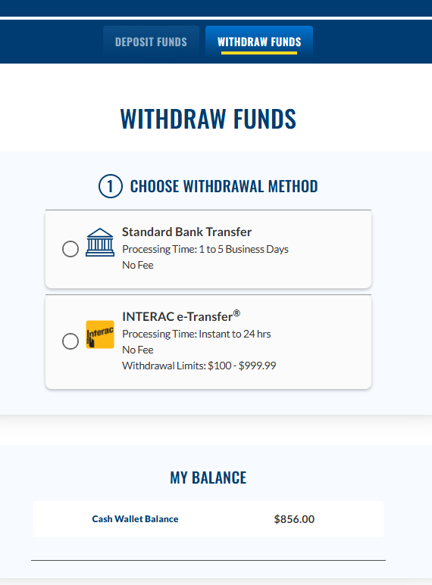
CHOOSE YOUR WITHDRAWAL METHOD
Choose your withdrawal method. If you select Standard Bank Transfer, you will be prompted to set up a bank account. If you choose INTERAC e-Transfer, you will be prompted to set up your email for INTERAC e-Transfer Autodeposit.
GATHER YOUR BANKING DOCUMENTS
Grab a void cheque, cleared cheque, or a bank statement. You’ll need the following bank account details for Step 2:
Banking institution number (3 digits)
Branch transit number (5 digits)
Account number (up to 12 digits)
Keep your document(s) containing these details nearby, and then click ‘Next’.
Keep your document(s) containing these details nearby, and then click ‘Next’.

SET UP BANK ACCOUNT
Next, enter your banking institution, transit and account numbers in the given fields. Then click ‘Next’ to save your banking details and proceed to the next step. You’re halfway there!

UPLOAD DOCUMENTS
Next, verify your account by securely uploading documents containing your name, address and banking information. Please upload one recent bank document dated within the past 2 months. Acceptable documents include copies, electronic images or downloads of a:
- Bank Statement (no older than 2 months, date must be displayed)
- Void Cheque / Electronic Void Cheque
- Cleared Cheque (no older than 2 months, date must be displayed)
To proceed with uploading the required documents, click ‘Next’ to submit your documents and get verified.

SELECT YOUR FILES
Select your files using jpeg, png, heic or pdf formats and then click “Submit” to upload your documents.
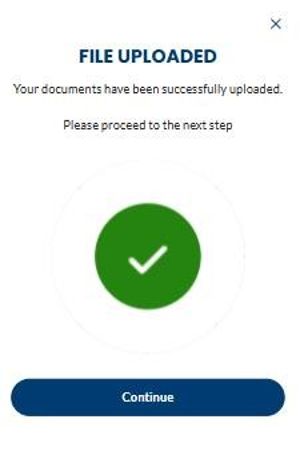
The system will take a few seconds to finish uploading your documents.

REVIEW YOUR INFO
The next step is for us to review your bank account information and uploaded documents.
Once verified, your bank account will be added, and you will be able to withdraw your funds!
ID VERIFICATION
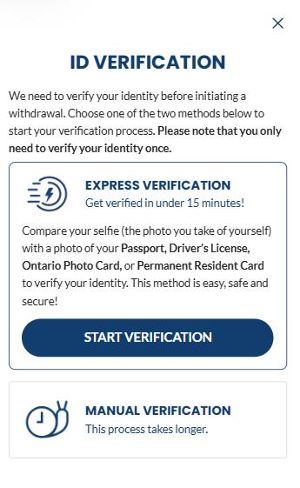
As part of the withdrawal process, we may also verify each Player’s Identity to meet FINTRAC regulations. If your identity hasn’t been verified yet, or you did not complete your Photo ID verification at the time of registering for an OLG.ca account, you can choose the Express Verification method by submitting a photo of your Government ID and then taking a selfie to verify your identity. Learn more about Express Verification here.
Bank Account Information Statuses
Bank Account Information Statuses

-
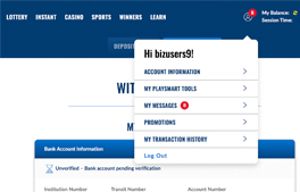
- Unverified – Bank account pending verification
- If you see this below ‘My Bank Account’, you
cannot withdraw funds until your bank account
is verified. Once verified, you can proceed
to STEP 3.

-
- Verified – Verified Account
- Woohoo! If you see this below ‘My Bank Account’,
you’re all set to proceed to STEP 3! Nice one!


STANDARD BANK TRANSFER
STANDARD BANK TRANSFER
ENTER & SUBMIT YOUR WITHDRAWAL AMOUNT
You’re now ready to withdraw! Enter the amount you wish to withdraw into the field and click ‘Submit.’

Once submitted, you will get a notification saying your request has been received and is pending approval. You can also scroll down to your ‘Pending Withdrawals’ to check.

Made a mistake or changed your mind?
No worries, if your Standard Bank Transfer withdrawal request is still pending review by OLG, simply scroll down to your ‘Pending Withdrawals’ and click ‘Cancel’ on the specific request.
If your Standard Bank Transfer request has been processed by OLG, it cannot be cancelled.
If your Standard Bank Transfer request has been processed by OLG, it cannot be cancelled.

VIEW ALL YOUR SUCCESSFUL WITHDRAWALS
Click the Player Icon, select ‘My Transaction History’, then ‘Banking Transactions.’
INTERAC E-TRANSFER
INTERAC E-TRANSFER
ENTER & SUBMIT YOUR WITHDRAWAL AMOUNT
You’re now ready to withdraw! Enter the amount you wish to withdraw into the 'Enter Withdrawal Amount' field and click ‘Submit.’
Note: Make sure your INTERAC email is autodeposit enabled.
Note: Make sure your INTERAC email is autodeposit enabled.
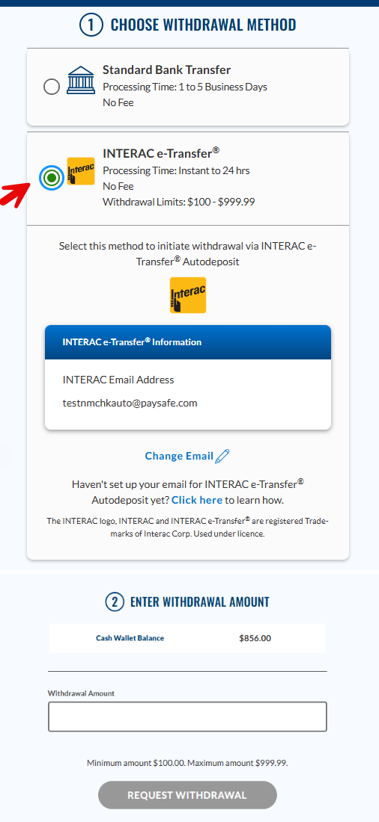
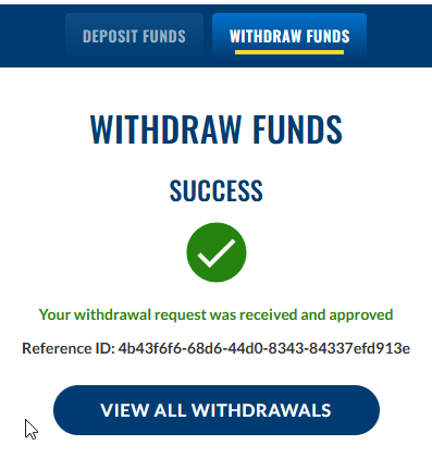
Once submitted, you will get a notification saying your withdrawal request was received and approved. You can also view all your withdrawals.
Note: You can make one withdrawal request per day between 8:00 AM and 7:59 AM the next day. If your transaction is unsuccessful, you may submit another withdrawal request. Otherwise, please wait until 8:00 AM to submit another withdrawal request.
Note: You can make one withdrawal request per day between 8:00 AM and 7:59 AM the next day. If your transaction is unsuccessful, you may submit another withdrawal request. Otherwise, please wait until 8:00 AM to submit another withdrawal request.
VIEW ALL YOUR SUCCESSFUL WITHDRAWALS
Click the Player Icon, select ‘My Transaction History’, then ‘Banking Transactions.’
The email address used for your INTERAC e-Transfer withdrawal will also be displayed here.
Note: INTERAC e-Transfer withdrawal requests can’t be cancelled once successfully completed.
The email address used for your INTERAC e-Transfer withdrawal will also be displayed here.
Note: INTERAC e-Transfer withdrawal requests can’t be cancelled once successfully completed.

related tutorials
You must be of legal age to play — that’s 19+ for casino games, and 18+ for lottery. And you must be residing in Ontario and located in the province at the time you intend on playing. Sound good? Let’s play.
{{ $i18n("lottery-product-tile-currently-drawing-numbers") }}