
Need help registering or more information about accepted forms of documentation? Click through to learn more.
To create an account on OLG.ca:
- You must currently be residing in Ontario and provide supporting proof if required.
- You have to be 18 or older.
- To play Casino and Sports betting, you have to be 19 or older.
Please review the Lottery Account FAQ page.
Your username is your unique identifier. You can use your username instead of your email address when you login.
Your username should include:
Between 8-25 characters;
Only alphanumeric characters (A-Z, 0-9), periods, hyphens, and underscores (.-_) are allowed.
Your username cannot include:
Spaces;
Special characters or symbols (e.g., @, #, $, %, &, *).
You can also follow our Registration Tutorial with visuals if you need more assistance.
STEP 1: ENTER YOUR EMAIL ADDRESS
STEP 2: TELL US ABOUT YOURSELF
Name, residential address, and date of birth should be as accurate as possible.
STEP 3: SET YOUR PREFERENCES
This includes language and marketing preferences.
STEP 4: REVIEW & SUBMIT YOUR REGISTRATION
STEP 5: VERIFY EMAIL ADDRESS
Go to your email inbox (check your junk/spam folder).
Look for the subject line, “Activate your Account.” Inside, you can verify your email address to start playing.
STEP 6: SUCCESSFUL REGISTRATION
Once you have submitted your information and your identity has been verified successfully, you’re ready to play!
In some cases, additional identity verification is required to complete your account.
OLG requires additional documentation to verify your identity. You have two ways submit – Express Verification or Document Verification.
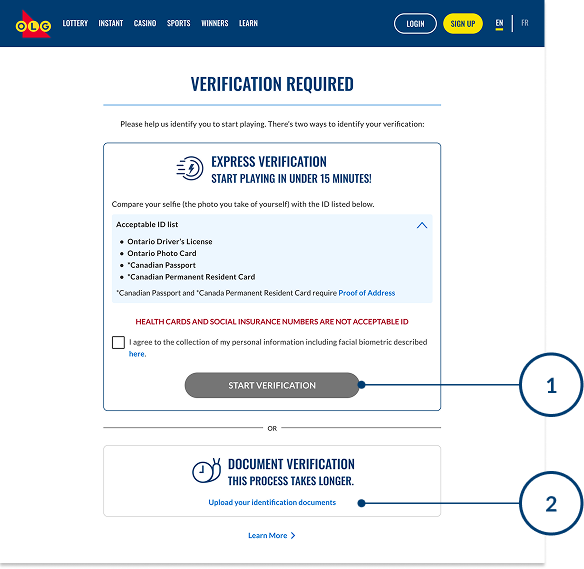
1. Express Verification
Accepted Government ID:
- Valid Ontario Driver’s Licence
- Valid Ontario Photo Card
- Canadian Passport
- Canadian Permanent Resident Card
2. Document Verification
If you don’t have the above documents, please submit one from each box below.
Government issued ID
|
Bills and Statements
All documents must be recent (within 2 months) |
HEALTH CARDS AND SOCIAL INSURANCE NUMBERS ARE NOT ACCEPTABLE ID
You need to verify your email address within 30 days of receiving the ‘Activate your Account’ email from OLG.
After you register, check your inbox for the verification email and click the link inside to activate your account.
If you don’t see the email:
Check your junk or spam folder.
Make sure emails from support@confirmations.olg.ca are allowed or added to your safe sender list.
Search your inbox for “Activate your Account.”
If your verification link has expired or you didn’t verify within 30 days:
The original link will no longer work.
You’ll need a new verification email to complete your account activation.
Contact Player Support to request that a new verification email be sent to you.